
Microsoft Defender has investigated malicious Chromium-based browser extensions that impersonate legitimate AI assistant tools to collect LLM chat histories and browsing data. Reporting indicates these extensions have reached approximately 900,000 installs. Microsoft Defender telemetry also confirms activity across more than 20,000 enterprise tenants, where users frequently interact with AI tools using sensitive inputs.
The extensions collected full URLs and AI chat content from platforms such as ChatGPT and DeepSeek, exposing organizations to potential leakage of proprietary code, internal workflows, strategic discussions, and other confidential data.
At scale, this activity turns a seemingly trusted productivity extension into a persistent data collection mechanism embedded in everyday enterprise browser usage, highlighting the growing risk browser extensions pose in corporate environments.
Attack chain overview
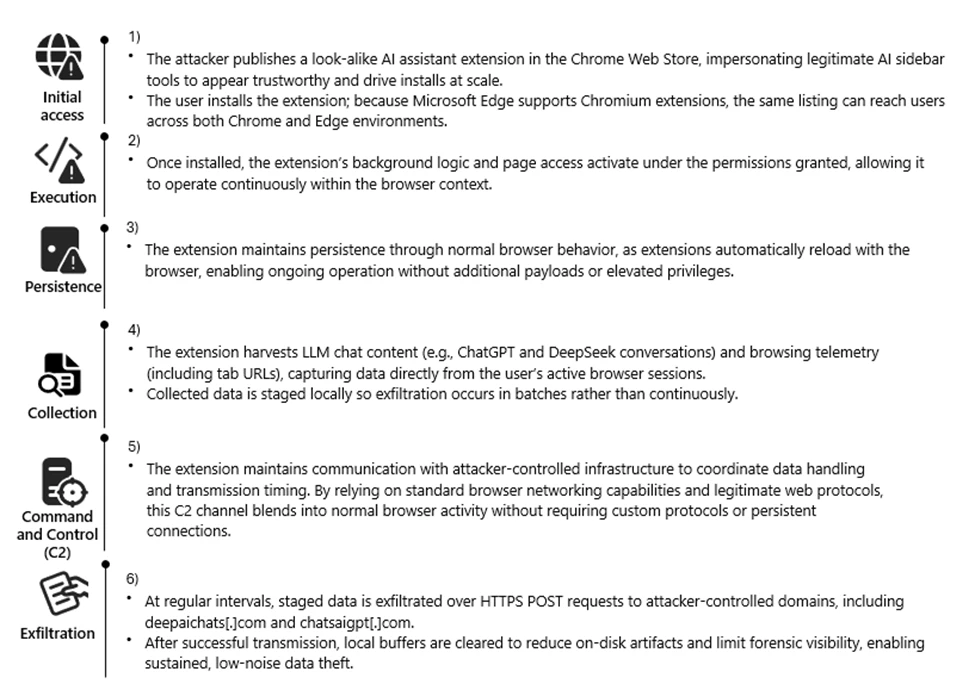
Reconnaissance
The threat actor targeted the rapidly growing ecosystem of AI-assistant browser extensions and the user behaviors surrounding them. Many knowledge workers install sidebar tools to interact with models such as ChatGPT and DeepSeek, often granting broad page-level permissions for convenience. These extensions also operate across Chromium-based browsers such as Google Chrome and Microsoft Edge using a largely uniform architecture.
We also observed cases where agentic browsers automatically downloaded these extensions without requiring explicit user approval, reflecting how convincing the names and descriptions appeared. Together, these factors created a large potential audience that frequently handles sensitive information in the browser and a platform where look-alike extensions could blend in with minimal friction.
The actors also reviewed legitimate extensions, such as AITOPIA, to emulate familiar branding, permission prompts, and interaction patterns. This allowed the malicious extensions to align with user expectations while enabling large-scale telemetry collection from browser activity.
Weaponization
The threat actor developed a Chromium-based browser extension compatible with both Google Chrome and Microsoft Edge. The extension was designed to passively observe user activity, collecting visited URLs and segments of AI-assisted chat content generated during normal browser use.
Collected data was staged locally and prepared for periodic transmission, enabling continuous visibility into user browsing behavior and interactions with AI platforms.
To reduce suspicion, the extension presented its activity as benign analytics commonly associated with productivity tools. From a defender perspective, this stage introduced a browser-resident data collection capability focused on URLs and AI chat content, along with scheduled outbound communication to external infrastructure.
Delivery
The malicious extension was distributed through the Chrome Web Store, using AI-themed branding and descriptions to resemble legitimate productivity extensions. Because Microsoft Edge supports Chrome Web Store extensions, a single listing enabled distribution across both browsers without requiring additional infrastructure.
User familiarity with installing AI sidebar tools, combined with permissive enterprise extension policies, allowed the extension to reach a broad audience. This trusted distribution channel enabled the extension to reach both personal and corporate environments through routine browser extension installation.
Exploitation
Following installation, the extension leveraged the Chromium extension permission model to begin collecting data without further user interaction. The granted permissions provided visibility into a wide range of browsing activity, including internal sites and AI chat interfaces.
A misleading consent mechanism further enabled this behavior. Although users could initially disable data collection, subsequent updates automatically re-enabled telemetry, restoring data access without clear user awareness.
By relying on user trust, ambiguous consent language, and default extension behaviors, the threat actor maintained continuous access to browser-resident data streams.
Installation
Persistence was achieved through normal browser extension behavior rather than traditional malware techniques. Once installed, the extension automatically reloaded whenever the browser started, requiring no elevated privileges or additional user actions.
Local extension storage maintained session identifiers and queued telemetry, allowing the extension to resume collection after browser restarts or service worker reloads. This approach allowed the data collection functionality to continue across browser sessions while appearing similar to a typical installed browser extension.
Command and Control (C2)
At regular intervals, the extension transmitted collected data to threat actor–controlled infrastructure using HTTPS POST requests to domains including deepaichats[.]com and chatsaigpt[.]com. By relying on common web protocols and periodic upload activity, the outbound traffic appeared similar to routine browser communications.
After transmission, local buffers were cleared, reducing on-disk artifacts and limiting local forensic visibility. This lightweight command-and-control model allowed the extension to regularly transmit browsing telemetry and AI chat content from both Chrome and Microsoft Edge environments.
Actions on Objective
The threat actor’s objective appeared to be ongoing data collection and visibility into user activity. Through the installed extension, the threat actor collected browsing telemetry and AI-related content, including prompts and responses from platforms such as ChatGPT and DeepSeek. Telemetry was enabled by default after updates, even if previously declined, meaning users could unknowingly continue contributing data without explicit consent.
This data provided insight into internal applications, workflows, and potentially sensitive information that users routinely shared with AI tools. By maintaining periodic exfiltration tied to persistent session identifiers, the threat actor could maintain an evolving view of user activity, effectively turning the extension into a long-term data collection capability embedded in normal browser usage.
Technical Analysis
The extension runs a background script that logs nearly all visited URLs and excerpts of AI chat messages. The data is stored locally in Base64-encoded JSON and periodically uploaded to remote endpoints, including deepaichats[.]com.
Collected data includes full URLs (including internal sites), previous and next navigation context, chat snippets, model names, and a persistent UUID. Telemetry is enabled by default after updates, even if previously declined. The code includes minimal filtering, weak consent handling, and limited data protection controls.
Overall, the extension functions as a broad telemetry collection mechanism that introduces privacy and compliance risks in enterprise environments.
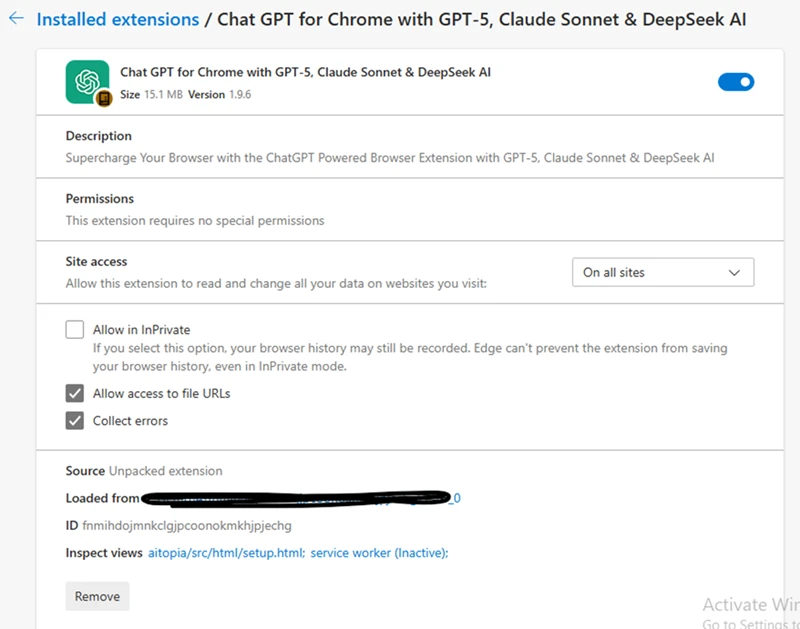
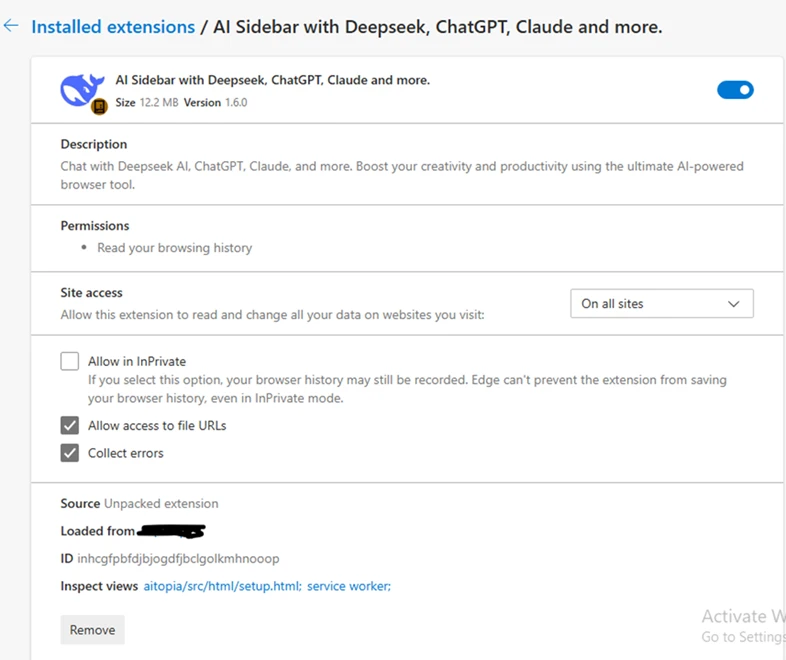
The following screenshots show extensions observed during the investigation:
Mitigation and protection guidance
- Monitor network POST traffic to the extension’s known endpoints (*.chatsaigpt.com, *. deepaichats.com, *.chataigpt.pro, *.chatgptsidebar.pro) and assess impacted devices to understand scope of data exfiltrated.
- Inventory, audit, and apply restrictions for browser extensions installed in your organization, using Browser extensions assessment in Microsoft Defender Vulnerability Management.
- Enable Microsoft Defender SmartScreen and Network Protection.
- Leverage Microsoft Purview data security to implement AI data security and compliance controls around sensitive data being used in browser-based AI chat applications.
- Create, monitor, and enforce organizational policies and procedures on AI use within your organization.
- Finally, educate users to avoid side‑loaded or unverified productivity extensions. Also suggest end users review their installed extensions in chrome or edge and remove unknown extensions.
Microsoft Defender XDR detections
Microsoft Defender customers can refer to the list of applicable detections below. Microsoft Defender XDR coordinates detection, prevention, investigation, and response across endpoints, identities, SaaS apps, email & collaboration tools to provide integrated protection against attacks like the threat discussed in this blog.
Customers with provisioned access can also use Microsoft Security Copilot in Microsoft Defender to investigate and respond to incidents, hunt for threats, and protect their organization with relevant threat intelligence.
| Tactic | Observed activity | Microsoft Defender coverage |
| Execution, Persistence | Malicious extensions are installed and loaded | Microsoft Defender for Endpoint – Attempt to add or modify suspicious browser extension, Suspicious browser extension load – Trojan:JS/ChatGPTStealer.GVA!MTB, Trojan:JS/Rossetaph |
| Exfiltration | User ChatGPT and DeepSeek conversation histories are exfiltrated | Microsoft Defender for Endpoint Attack C2s are blocked by Network Protection |
Hunting queries
Microsoft Defender XDR
Browser launched with malicious extension IDs
Purpose: high confidence signal that a known‑bad extension is present or side‑loaded.
DeviceProcessEvents
| where FileName in~ ("chrome.exe","msedge.exe")
| where ProcessCommandLine has_any ("fnmihdojmnkclgjpcoonokmkhjpjechg", "inhcgfpbfdjbjogdfjbclgolkmhnooop"  )  // “Chat GPT for Chrome with GPT‑5, Claude Sonnet & DeepSeek & AI Sidebar with Deepseek, ChatGPT, Claude and more”)
| project Timestamp, DeviceName, Account=InitiatingProcessAccountName, FileName, ProcessCommandLine, InitiatingProcessParentFileName
| order by Timestamp desc
Outbound Connections to the Attacker’s Infrastructure
Purpose: Direct evidence of browser traffic to the campaign’s domains.
DeviceNetworkEvents
| where RemoteUrl has_any ( "chatsaigpt.com","deepaichats.com","chataigpt.pro","chatgptsidebar.pro")
| project Timestamp, DeviceName, InitiatingProcessFileName, InitiatingProcessCommandLine,RemoteUrl, RemoteIP, RemotePort, Protocol
| order by Timestamp desc
Installations of Malicious IDs
Purpose: Enumerate all devices where either of the two malicious IDs is installed.
DeviceTvmBrowserExtensions
| where ExtensionId in ("fnmihdojmnkclgjpcoonokmkhjpjechg", "inhcgfpbfdjbjogdfjbclgolkmhnooop")
| summarize Devices=dcount(DeviceName) by BrowserName
| order by Devices desc
Detecting On-Disk Artifacts of Malicious Extensions
Purpose: Identify any systems where the malicious Chrome or Edge Extensions are present by detecting file activity inside their known extension directories.
DeviceFileEvents
| where FolderPath has_any ( @"\AppData\Local\Google\Chrome\User Data\Default\Extensions\fnmihdojmnkclgjpcoonokmkhjpjechg",@"\AppData\Local\Google\Chrome\User Data\Default\Extensions\inhcgfpbfdjbjogdfjbclgolkmhnooop",@"\AppData\Local\Microsoft\Edge\User Data\Default\Extensions\fnmihdojmnkclgjpcoonokmkhjpjechg",@"\AppData\Local\Microsoft\Edge\User Data\Default\Extensions\inhcgfpbfdjbjogdfjbclgolkmhnooop")
| where ActionType in~ ("FileCreated","FileModified","FileRenamed")
| project Timestamp, DeviceName, InitiatingProcessFileName, ActionType, FolderPath, FileName, SHA256, AccountName
| order by Timestamp desc
References
- Malicious Chrome Extensions Steal ChatGPT Conversations
- Microsoft Defender for Endpoint – Microsoft Defender for Endpoint
- Microsoft Defender Vulnerability Management – Microsoft Defender Vulnerability Management
- Microsoft Defender SmartScreen overview
- Microsoft Purview data security and compliance protections for Microsoft 365 Copilot and other generative AI apps
This research is provided by Microsoft Defender Security Research with contributions from Geoff McDonald and Dana Baril.
Learn more
Review our documentation to learn more about our real-time protection capabilities and see how to enable them within your organization.
- Explore how to build and customize agents with Copilot Studio Agent Builder
- Microsoft 365 Copilot AI security documentation
- How Microsoft discovers and mitigates evolving attacks against AI guardrails
- Learn more about securing Copilot Studio agents with Microsoft Defender
- Learn more about Protect your agents in real-time during runtime (Preview) – Microsoft Defender for Cloud Apps
The post Malicious AI Assistant Extensions Harvest LLM Chat Histories appeared first on Microsoft Security Blog.